Year-Round Schooling Changes
How to Change the Formulas to Reflect a School Year that is Longer than 9 Months.
Go to Information Tab

The attendance counter on the Print sheet is coded to a standard 5-month first semester and a 5-month second semester. The code is linked to the Attendance sheet. If you school year-round, then this will not work for you and you will need to change the formula.
Changing the formula is easy. All you have to do is make a minor change in the proper cell.
- Go to the Information Tab
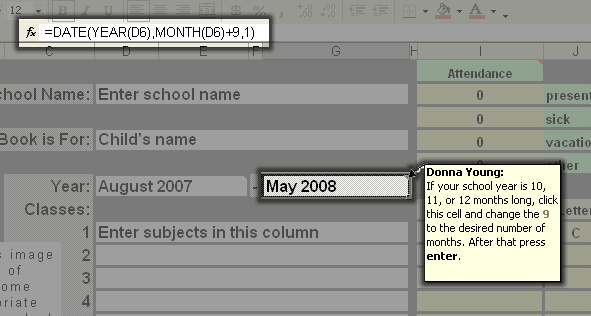
- Click on cell G6
- See the image below, notice the number 9 in the formula.
- Change the number 9 to the number of months which is your school year
minus 1.
8 = a 9-month year (or 8-months later from the beginning)
9 = a 10-month year (or 9-months later from the beginning)
10 = an 11-month year (or 10-months later from the beginning)
11 = a 12-month year (or 11-months later from the beginning) - Press End on your keyboard, or click the formula so that the curser is at the end of the formula.
- Press Enter
The image shows the original formula.
Related: Year-Round Schooling Changes - Changing the Semester Length in Print
Help Pages
Set Up: Quick Start Guide - Information Tab |
Subject Tabs - Adjusting the Grade Weight |
Subject Tabs - Credits |
Set up Your Grade Scale |
Enter Attendance - Calendar Tab |
How to Change the Date on the G&A Calendar |
FAQs: FAQs - Frequently Asked Questions |
I can't see the Tabs: Minimized vs Maximized |
Print Preview and Printing |
Timing and Placing the Scores |
How to Unprotect and Protect a Sheet |
Not Using the Grade Weight |
Year-Round Schooling Changes - Change number of months in school year. |
Year-Round Schooling Changes - Changing the Semester in Print
Hello Visitor!
I am currently working on this website to add to its ginormousness. Thank you for visiting, and please subscribe yearly to access my many printable files! Donna Young
May 13, 2021


 What?! A Handwriting Planner.. whaaaaat?
 Coloring Shapes
 Lab Write-up
 Member's Login
 RSS Feed